Sunday, December 28, 2008

Thumbnails \o/


After several weeks of often-interrupted effort, I have finally made progress on support for thumbnails on video clips. Thumbnails are fetched asynchronously and then cached. I have optimized the drawing routines to only draw the visible portions of each clip, so the thumbnail strips render quickly and do not seem to significantly slow down dragging or trimming on my machine. I'm fairly satisfied with the results. What remains now is to implement a caching strategy so that we don't eventually consume all available memory with 50x50 thumbnail images. I'm working on this in parallel with waveforms, which present slightly different challenges. Eventually I hope to modularize both thumbnail and waveform code in such a way that we can easily add new media types to PiTiVi, or optimize special cases such as still images (which just display the same thumbnail repeatedly).

In other news, I have finished my undergaduate education at UC Berkeley. Man, that feels good.

Sunday, November 16, 2008

Mockups

Recently I've realized that there are a number of things about PiTiVi that were and still are not clear in my mind. So, I've been working on improving the PiTiVi UI design document, particularly with mock-ups -- these are still images or sequences of still images which show how the program is supposed to behave. I've been working for quite a while, but the longer I work, the more unfinished things I seem to notice. On the other hand, it's a pretty amazing experience to watch previously vague ideas start to "gell" into something coherent. I actually have a much better idea how pitivi's features fit together, and where I still need to put more thought into the design.

You can see some of the work i've uploaded here: http://pitivi.org/wiki/UI_Design. At first it was slow-going. It had been several versions since I'd used GIMP. Also, it was a bit tedious to build up components like long strips of 50-pixel high thumbnails. Now that I have a library of bits and pieces, it's a little easier to build the scenarios I dream up. Anyways, I think I've identified most of the areas that I need to develop image sequences for.

As always, I welcome your feedback. Also, if anyone wants to help with this, talk to me.

Saturday, November 8, 2008

bling

I've been working on waveforms for audio clips. It's not quite usable yet: having these waveforms slows down re-drawing considerably, which brings the entire GUI to a screeching halt. At least I was able to get this screenshot, which looks like progress to me.

Sunday, November 2, 2008

The Shape of Thigns To Come

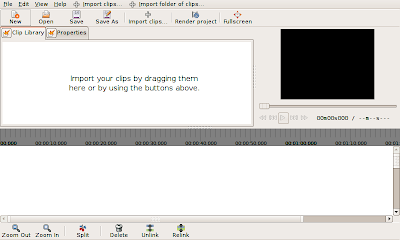
I decided that the default layout of PiTiVi's controls was pretty stupid, so I spent some time tweaking that today. First, I adjusted the way in which space is divided among the three main interface components. By default, you'll see this arrangement. When you resize or fullscreen PiTiVi's main window, only the timeline area grows, unless you explicitly move the separator. I think most users will appreciate this.
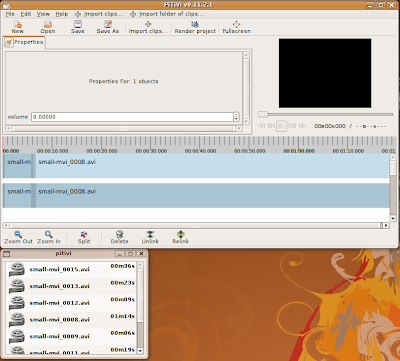
Today also marks the introduction of two new features: Detachable components, and the property editor.

Detachable Components

This feature you to separate each of the tabs above the timeline into a separate window by clicking the button next to the tab label. When you close the new window, the tab returns to its original position. Eventually the viewer will be detachable as well, but my first attempt at implementing this caused PiTiVi to crash immediately! Since we're planning to clean up the viewer code soon, I decided it made sense to hold off on making it detachable. Why did I spend time on this? Because some people will have multiple screens on which they'd like to work, and we want people to be able to full-screen the viewer if they choose. There's currently no way to full-screen a window across multiple screens. I also suspect that the default layout is going to feel cramped for some people, and I decided that the most flexible approach is simply to let people move whatever component they want into its own window.

Some of you may have noticed that I did things a little differently than other GTK+ applications. The truth is that I don't really like the drag-and-drop tab approach taken by the gimp. For one thing, it's not clear that the feature exits in the first place, since there's nothing to clue you into the fact that the tabs are movable (hell, I didn't even know you could do that...). This system has the advantage of simplicity. Either a component is in the main window or its own window. To detach it, you click the button next to its name. To restore it to its original location, just close the window you opened. PyGTK makes it really easy to pull this kind of trickery.

Property Editor

The Property Editor is going to become a central component of PiTiVi's interface. This is where you'll have access to the 'special' features of the objects you select in the timeline. As an example, consider the use case of still images. You may import a large image and wish to crop it down to a section. The image may be a portrait and you might want to rotate it 90 degrees. At the moment, we have code to support images, but up until now there was no place in the UI for you to adjust these kinds of settings. Basically whenever an object needs a specialized interface, it will appear in the Property Editor when you select the object.

Saturday, November 1, 2008

Icons Found


Special thanks to Jean-François Fortin Tam, (Nekohayo on IRC) who submitted some icons for me to use on the new toolbar buttons. Any feedback would be appreciated.

Wednesday, October 29, 2008

Icons Needed

My refactoring of the UI is nearly complete, so I've started adding new features to PiTiVi. Today I got the Unlink/Relink features working. Normally audio and video clips are linked together. Now you can unlink them and manipulate them separately. Relink allows you to reconnect a source to it's mate if you Unlinked them by accident. I have a couple more features planned for the near future, including: "collapse", which eliminates gaps in the selection; and select-before and -after, which select all sources right or left of the currently selected source(s).

This means we'll need some artwork to help represent these features. I'm using stock icons for now, and as you can see, it's not the best fit. The razor tool is easily mistaken for the "cut to clipboard" command, and the it's not at all clear what on earth "connect" and "disconnect" do. Anyone interested?

Master List of Icons

Other things on the horizon include thumbnail previews for sources, and audio waveforms for audio files. After I get through that, I'll start working on a keyframe-curve for audio-volume.

Friday, October 24, 2008

Sorry, it's been a while

Good news! I'm now a Collabora employee, hired part-time to hack on PiTiVi. We have set a deadline for this coming April to finally have a usable release. It's rather ambitious, considering how long this project has been languishing, but I think we're finally in a position to really make some progress. Now that we have basic cutting and trimming, we're moving on to the more challenging features. The following is a list of the user-visible features we want to have working by this April.
  1. moving/trimming multiple items
  2. support for still images (along with zooming, croping, rotating and scaling)
  3. linking and unlinking clips
  4. multi-layer editing...
  5. ..which goes hand-in hand with audio mixing and video compositing...
  6. ...as well as basic video effects.
  7. undo/redo support
This is the big push, and unfortunately, it requires more back-end work. At least this time, I'll be able to help out with a good portion of it, since a few of the changes are based on my own ideas. The refactoring will enable the features listed above, as well as support some long-term goals:
  1. Multi-track editing (i.e. multiple named output channels)
  2. Subsequences and subcompositions
  3. Combining media media from multiple sources into a unified objects (syncing separate audio and video, for example, or combining video from multiple cameras into a single object)
  4. Converting between media types, like converting an audio stream to a video stream with a visualizer plugin.
  5. Pre-rendering and caching of data.
  6. Re-conforming a project between different resolutions, codecs, and container formats.
I have already started work on an improved UI framework, which is almost complete. When the existing interface is ported over to it, we'll be able to add new features more easily than at present.

We're also adding a new UI component: the property editor, which will allow the user to tweak per-object properties. This interface will also be extensible: modules and plugins can provide appropriate controls for a wide range of editing tasks, from chroma key to animation.

We're getting there, slowly but surely.